
Self-Hosted Transcription on Your Own Servers
Scriber is self-hosted transcription software you install on your own server. Recordings are transcribed, summarized, and turned into finished minutes without ever leaving your infrastructure.
What Self-Hosted Transcription Means
Self-hosted transcription means the software that turns a recording into a transcript runs on a server you administer, not a subscription where audio is uploaded to someone else's infrastructure. With Scriber, every step from recording to finished minutes happens on hardware inside your own network.
What Scriber Does Once Installed
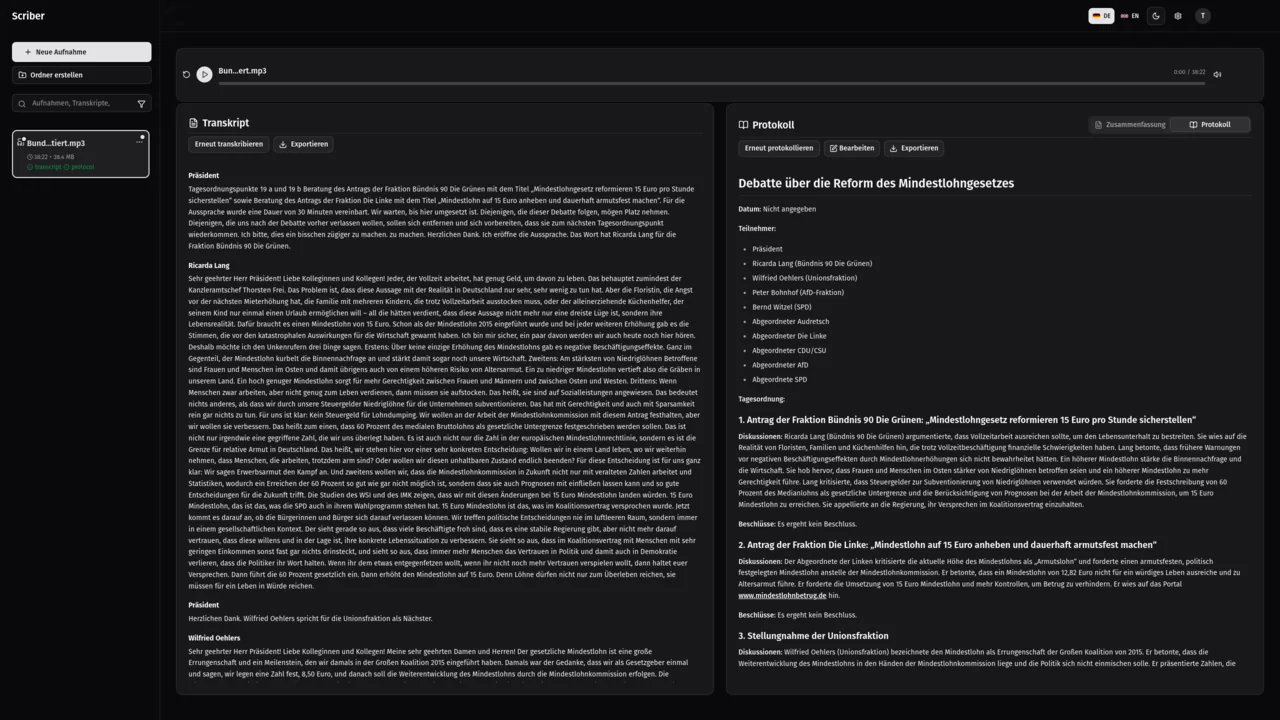
Record a meeting in the browser or through the Android app, or upload an existing audio file. Scriber transcribes it with speaker separation, so each contribution is attributed to the person who made it, then generates an automatic summary and finished meeting minutes: title, date, attendees, and each agenda item with its discussion and the decision taken.
Every recording lands in one searchable library, alongside its duration and processing status, so you can search across all transcripts to find a meeting and then a sentence within it. Transcripts and minutes can be exported as PDF, Word, plain text, Markdown, or JSON for the systems you already use.
What You Provide, What We Do
Running Scriber yourself splits cleanly between what you provide and what we handle before handover, in three stages that take you from a first conversation to a running installation on your own infrastructure, with clearly separated responsibilities at each stage along the way.
Initial Consultation
We review your requirements and existing infrastructure and agree where Scriber will run, what it may connect to, and how your minutes should be structured.
Installation On Your Server
We install and configure Scriber on your server and set up your minutes template, along with any other requests that you have.
Operation In Your Network
From then on Scriber runs entirely inside your network. You administer the installation and decide storage, retention, and deletion on your own infrastructure.
Why Teams Self-Host Transcription
Confidential recordings stay confidential when the processing never leaves the building. A self-hosted installation keeps data sovereignty with the customer, works offline including on air-gapped networks, and processes personal data only on your own systems, which supports your GDPR compliance by architecture rather than by contract.
For meetings, client conversations, or interviews that cannot be uploaded anywhere, that architecture is the point: the recording, the transcript, and the finished minutes stay under administration you control, from the first second of recording to long-term storage and eventual deletion.
Frequently Asked Questions
What is the difference between self-hosted and cloud transcription?
With self-hosted transcription, Scriber runs on your own server and no recording ever leaves your infrastructure. A cloud transcription subscription instead uploads your audio to a provider's servers for processing, outside your administration. See the self-hosted versus cloud comparison for the full picture, including where each approach makes sense.
What do we need to provide to run Scriber ourselves?
You need a server (the exact specifications depend on your usage, discussed in more detail during the initial consultation) for Scriber to run on. Beyond that, you give us access to configure Scriber during installation (or configure it yourself) and decide your own storage, retention, and deletion rules once it is running.
Who maintains a self-hosted Scriber installation?
We install and configure Scriber during the initial setup, including your minutes template and its connections to the systems you use. After that, it runs entirely inside your network under your own administration, the same as any other internal system. For support, reach us at [email protected].
Can we try Scriber before installing it?
Yes. A hosted demo is available at scriber.determin.de so you can see Scriber working before committing to an installation. It is a demo environment, not the product itself, so keep any confidential recordings for your own installation rather than for the demo.
Ready to Install Scriber on Your Servers?
Tell us about your infrastructure and we will schedule the initial consultation.