
Transcription for the Public Sector
Council sessions, committee meetings, and public hearings produce records that must be accurate and must stay under the authority's own control. Scriber turns a recorded session into a speaker-separated transcript and finished minutes, running entirely on your own servers, engineered in Europe.
European Data Sovereignty for Public Administration
Sending recordings of sessions and hearings to a cloud service based outside Europe raises questions of jurisdiction and oversight that many public bodies cannot resolve to their own satisfaction. The record of a public meeting belongs on public infrastructure: the authority's own.
Scriber is engineered in Europe and installed on the authority's own servers. It runs offline-capable, including on closed or air-gapped networks, so a recording never has to leave the building to become a transcript, and no third party ever has a copy of it.
For a public authority this is not a convenience feature. A data-protection review asks where the recording goes and who can reach it; with an installation inside your own network, the answer stays short.
From Session to Finished Minutes
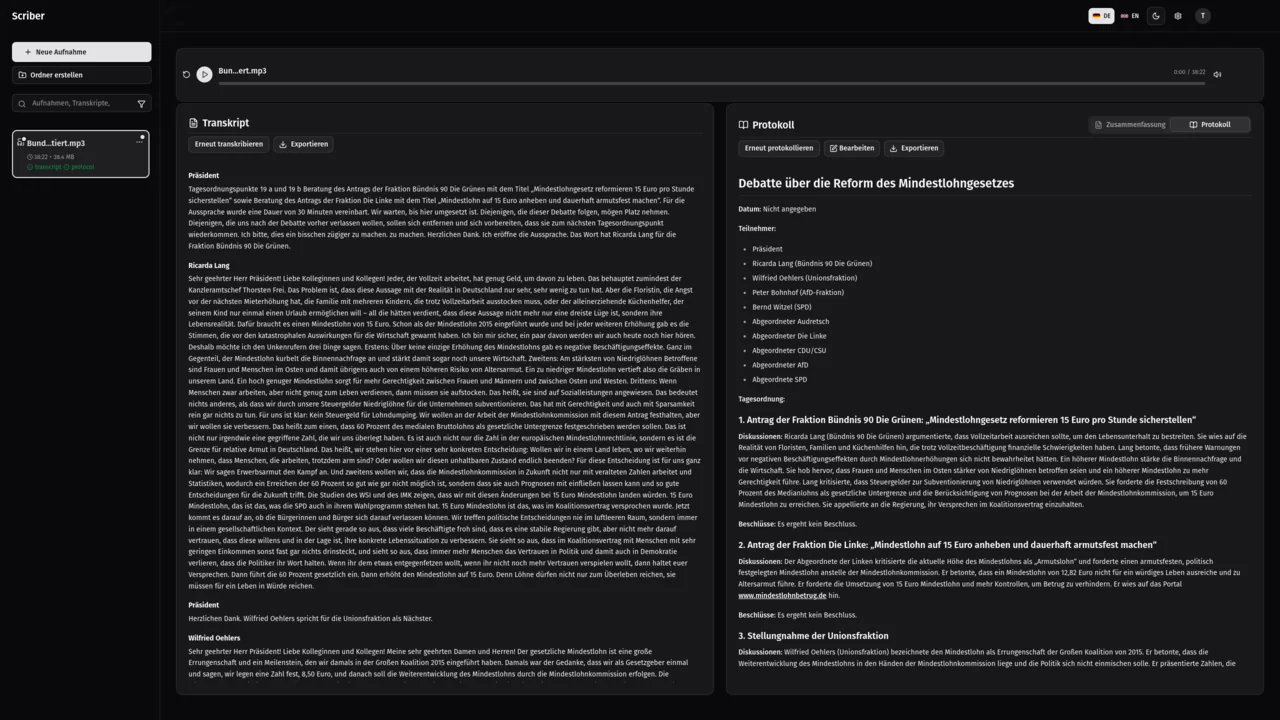
Record the session directly in the browser, or ingest a recording from wherever it originates. Scriber's speaker-separation model attributes every contribution to its speaker, so the transcript can be quoted with confidence. The figure on this page shows a parliamentary debate transcribed this way.
From that transcript, Scriber generates finished minutes: title, date, attendees, and each agenda item with its discussion and the decision taken. That is the document a session actually needs, not a raw recording someone still has to work through before it can be filed.
Fits Administrative Reality
Scriber covers the range of recorded work inside a public authority:
Recordings arrive by browser recording, manual upload, a watched folder on the server, or a network share. The minutes template is set up once, during installation, so every finished document follows the same structure. Exports are delivered as PDF, Word, plain text, Markdown, or JSON, to the folder or share you choose.
These are not separate tools. The same installation handles all of them, and every result lands in the one searchable library your archive already needs, whether a clerk is looking for a committee decision from last year or a hearing from last week.
Council & Committee Sessions
Full sessions and committee meetings, transcribed and turned into minutes ready to file.
Citizen Consultations & Hearings
Public hearings and consultation procedures, recorded and transcribed with the same care as any internal session.
Cross-Department Meetings
Internal meetings across departments, kept as a searchable record instead of scattered notes.
Interviews & Oral Records
Interviews and oral records, transcribed and filed alongside the rest of the archive.
Procurement and Operation
An installation begins with a consultation about your requirements and your existing systems. We then install and configure Scriber on your hardware and set up your minutes template.
From that point, Scriber operates entirely inside your network, run and maintained by us and your own IT staff; for support afterwards, we are reachable at [email protected]. Pricing is quoted once we understand your scale. The interface is available in German and English, and we can offer other languages on request.
Because everything remains inside your network, the same installation can serve every part of the authority that needs it: the clerk's office, committees, and any department running its own hearings, without a separate contract or a separate approval for each one.
Frequently Asked Questions
Can Scriber produce council meeting minutes automatically?
Yes. Scriber generates finished minutes from the session transcript: title, date, attendees, and each agenda item with its discussion and the decision taken. The minutes template is configured once, during installation, to match how your authority structures its records, so every session produces a consistent document.
Does it run inside a closed government network?
Yes. Scriber is installed on your own servers and works fully offline, including on an air-gapped network with no internet access at all. Nothing in it calls out, so recording, transcription, and minutes generation need no connection beyond your internal network at any point in the process.
Where does the data reside?
On your own servers for the entire lifetime of the recording. You set storage, retention, backup, and deletion on your own terms. No recording, transcript, or minutes document is transferred anywhere, and Determin never holds a copy of anything your authority records.
How is Scriber procured?
Pricing depends on your scale and requirements. The process starts with a consultation, followed by installation and configuration on your hardware, then operation entirely inside your network. Contact us at [email protected] to begin the consultation.
Bring Session Minutes In-House
Talk to us about installing Scriber on your authority's own infrastructure.